flowchart LR
  A["straight 132k, 65k<br>30 min"]
  B["filter 4x, 4x"]
  C["interpretation"]
  D["32 Hz (fil)"]
  E["LF<br>8 kHz<br>256 Hz sub "]
  F["remote download<br>256 Hz"]
  G["HF<br>4 kHz<br>64k shots"]

  A --> B
  B --> C
  D --> B
  G --> B
  E --> F
  E --> B
2 Jobs
You can not create a job in the past.
When the job page is accessed, the start date and time is updated to the current date and time once.
The stop date and time is stored as duration in the database.
$prep_time = 30s is added to the start date and time in case the start date and time is too “early”.
So finally a job shall start regardless if you press submit or start now.
While the selftest is active, you can’t submit a job.
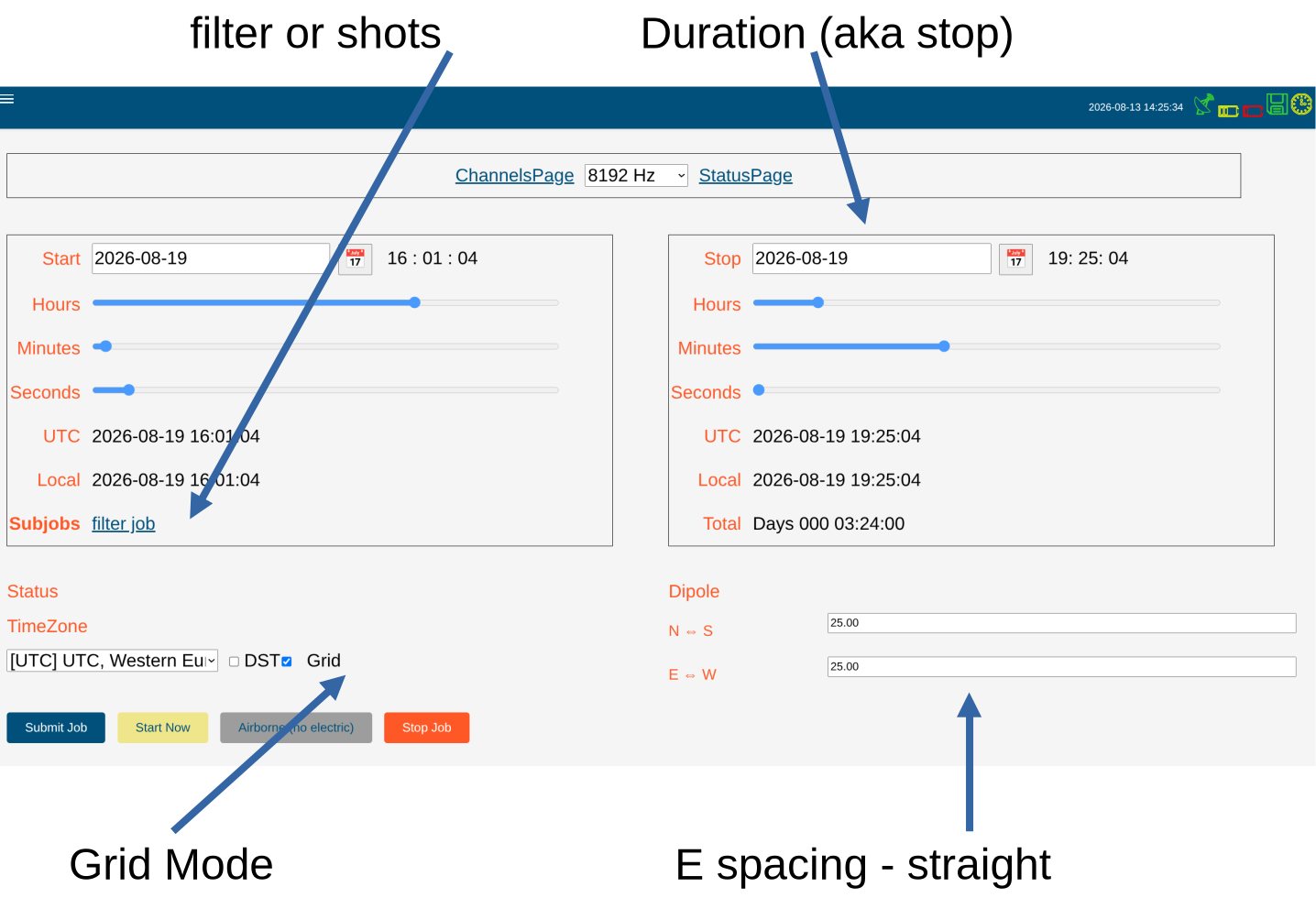
2.1 Creating a Job
2.1.1 First, select the sampling rate.
- Rates marked with (fil) are virtual low sampling rates, nothing to do further on, start a job.
- Rates not marked, can be used for additional filtering or for shots.
- additional filtering: record with 4 kHz and 128 Hz.
the 128 Hz you may want for remote download, the 4 kHz you download later. - shots: record with 2 kHz and 32 kHz overnight.
- get your continuous LF data with 2 kHz, later filter
- get your shot every 15 minutes with 32 kHz, later filter 4x.
From the shot data you select shots with good AMT activity.
You get a smooth sounding from 10 kHz down to 100 or 1000s - depending on how long you recorded.
- additional filtering: record with 4 kHz and 128 Hz.
We cover the following cases as displayed above:
- AMT, 2 km, high sampling rate only
- Fluxgate deep, 100 km, low sampling rate only
- typical overnight, 5 km, medium sampling rate plus shots
- deep with remote download / monitoring, 30 km, medium sampling rate plus filter
2.1.2 Start and Stop Date and Time
Internally start day and time and duration is stored (finally the system counts the second pulses from the GPS until stop).
For start time:
- Select from the date icon the day
- slide the start hour
- slide the minute
- slide the second
Tip
If Grid mode is checked, sliders will “jump” into start time 64 seconds grid.
This allows you always to make remote reference, regardless of the sampling rate.
Then for stop time:
- Select from the date icon the day
- slide the stop hour
- slide the minute
- slide the second
TipChange start
If you later decide to change the start time, stop time will shift accordingly.
2.1.3 E spacing
ImportantRotation
Do not even dream of using others setups. Only N→S and E→W are allowed here.
Troublemakers are not.
Supply the dipole length.
CautionTimeout
After 0.9 seconds the form is saved. You must be faster and type each digit in less than 0.9 seconds.
… age control 😊
2.1.4 TimeZone
Select a timezone for your work, additionally you can check “DST” (daylight saving time, aka summer time).
Hence that in the job tables, file names and others always UTC is used.
If DST is checked, the “start time” is shifted by 1 hour earlier, BUT the stop time is not correct when DST changes during recording1.
2.1.5 atss
To change between new atss and old ats, go to the channels page and toggle the atss button.
It will be stored in the hardware table and used for this and next jobs.
2.2 Submitting a Job
Ref. also to the program logic
If the programmed time (including preparation time) has passed by, the job is simply shifted to the next possible start time.
2.3 Special Jobs
- Sensor Detection: fast, takes 10 s
- auto gain / auto offset: long, takes ~ 3 min. Needs enough time to acquire a reliable estimate
- contact resistance: medium, takes ~ 1 1/2 min. AC currents are fed into the electrodes to measure the contact resistance.
DST = Daylight Saving Time, 1 hour+ sometimes 2 hours+ is today a troublemaker. No energy is saved, timetables of airlines and trains are mixed up. Some countries stopped DST. 84% of the Europeans 2018 voted against DST.↩︎