3 Status
3.1 Status Bar
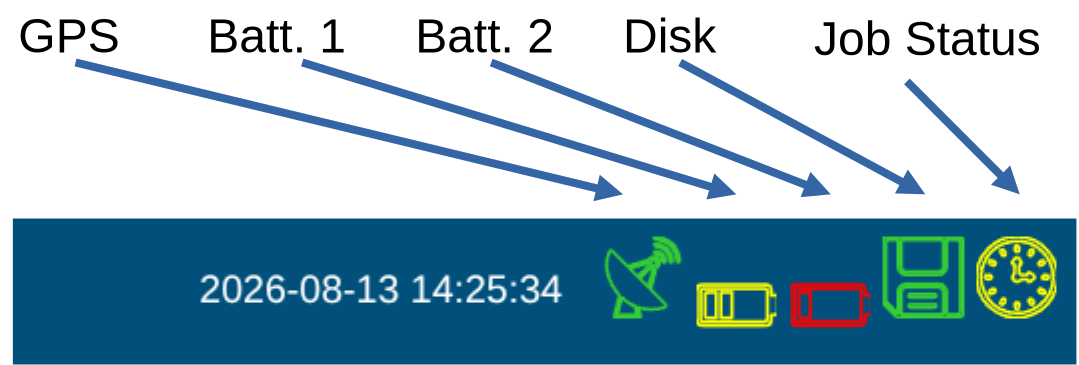
The actual GPS time is updated every two seconds from the database, and there it is cycled every few seconds from the GPS. So the time lacks always behind, up to 4 seconds (this is not meant to be a real-time display).
3.2 GPS 
Turns green when the GPS is locked, and red when the GPS is not locked.
Hence that the ADU does not adjust the time while recording. It makes sense to wait for lock. Especially for long jobs or remote reference do not start when the symbol is red!
3.3 Battery 
| Status | Color / Voltage |
|---|---|
| green: 100% battery voltage is | above 12.8 V green |
| green: 75% battery voltage is | above 12.2 V green  |
| yellow: 50% battery voltage is | above 11.8 V yellow  |
| red: 20% battery voltage is | below 11.8 V red  |
You can set the shutdown voltage in the configuration file.
LiIon batteries can have their own voltage controller and suddenly switch off at 12V.
echo "12.0" > /mtdata/mcp_sys/ExtraShutdownVoltage.txt
as root user, changes the shutdown voltage to 12.0 V for example.
3.3.1 Disk 
| Free Space | Color |
|---|---|
| > 40 GB free | green |
| > 20 GB free | yellow |
| < 20 GB free | red |
3.3.2 Timer
| Timer status | Symbol |
|---|---|
| Idle |  |
| Waiting |  |
| Recording |  |